Sharing
Share it anywhere
Create your card and send the link by text, WhatsApp, Instagram or any messaging app.
Some things are easier to show than to say. Put your favorite pictures and the song that's been yours from the start next to the words you mean, and send it all as one page they can open anywhere.
Free to create and preview · One-time payment to share
Twelve slots go fast. A few ideas for picking the ones that tell your story best:
An early photo, even a blurry one, reminds them how far you've come. Put it first.
Trips and celebrations are great, but a lazy Sunday on the couch is often the one that makes them smile.
If your letter mentions a memory, include the picture from that day so the words and the image land together.
Close with a recent photo. It quietly says: and we're still here.
The right song does half the work. If you don't have an obvious "our song," try one of these:
What was playing on your first road trip, at a wedding you went to together, or in the restaurant on your first date?
Off-key in the car counts. It shows you've been paying attention.
If one line of a song sums up how you feel, you can even quote it in your letter.
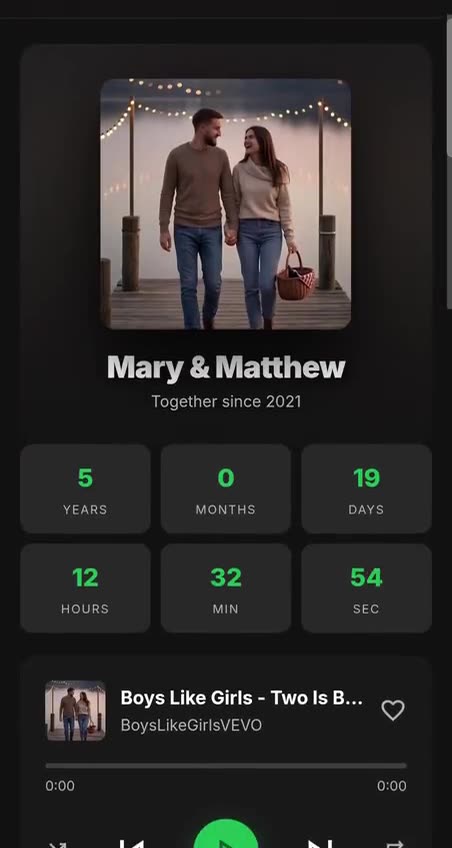
Looks like a music app, with your song front and center and your photos as the album art.
Your photos as instant prints, with the letter and counter beside them.
A mixtape look for couples whose story has a soundtrack.
See all of them on the digital love card designs page.
Up to 12 photos per letter. You can add, remove and swap them anytime before or after you share it.
Search for any song on YouTube right inside the editor and pick the version you want. A few videos don't allow playback on other websites. If that happens, the preview shows a message, and you can simply choose another version of the same song.
Phones and browsers don't allow music to start on its own, so the page shows a play button with your song's name. One tap and it plays while they scroll through your letter and photos.
Yes, with the Single card + Video or Lifetime plan you can export an MP4 to post or send. YouTube songs can't be included in the video for copyright reasons, so you can use the built-in soundtrack or upload an audio file you have the right to use.
Only people who have your link or QR code. Your letter isn't listed anywhere, and you can edit or delete it from your dashboard.
Creating and previewing your letter is free. To share it, plans start at $4.99 as a one-time payment, with no subscription. See all plans.
Payment
Secure checkout
Processed by Stripe. We never store your card details.
Guarantee
Refund policy
One-time payment, no subscription, and a 7-day refund window.
Sharing
Create your card and send the link by text, WhatsApp, Instagram or any messaging app.
Speed
Add your photos, song and message in just a few minutes. Nothing to install.
Peace of mind
Changed your mind? Ask for a refund within 7 days of purchase. Questions? Our support team is one email away.
Build your letter step by step and preview it with the music playing before anyone else sees it.
Start your card for freeFree to create and preview. Share it from $4.99, one-time payment.